
TASKalfa MZ7001i/MZ6001i/MZ5001i
Simple Operation and Clear Notifications
Send and receive faxes has never been easier with a simple operation screen and LED notification.
Intuitive operation screen
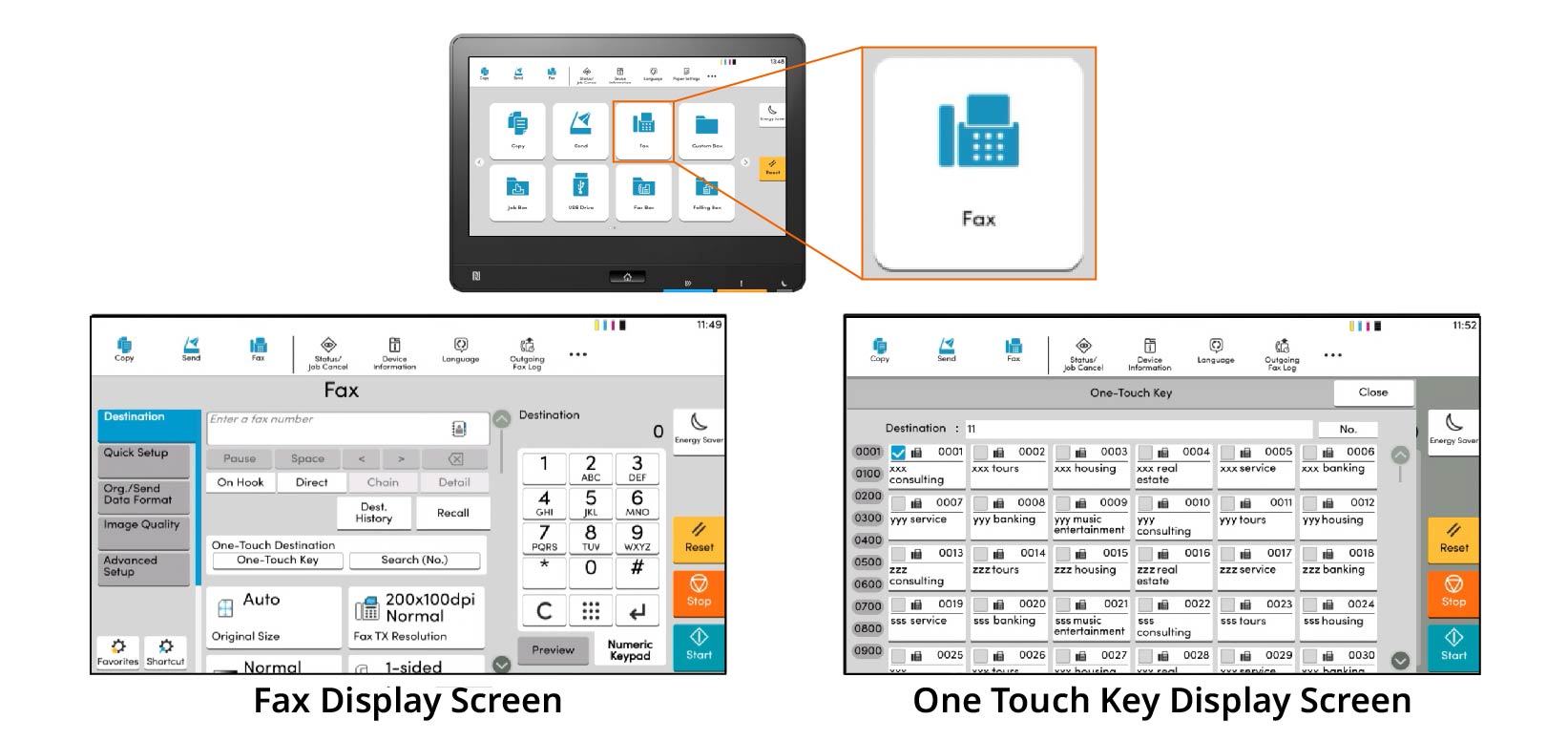
An easy-to-use, large touch panel on the device provides an easy and navigated operation with one-touch buttons, address book, and intuitative icons and text.
-
Notification of fax reception with light and sound
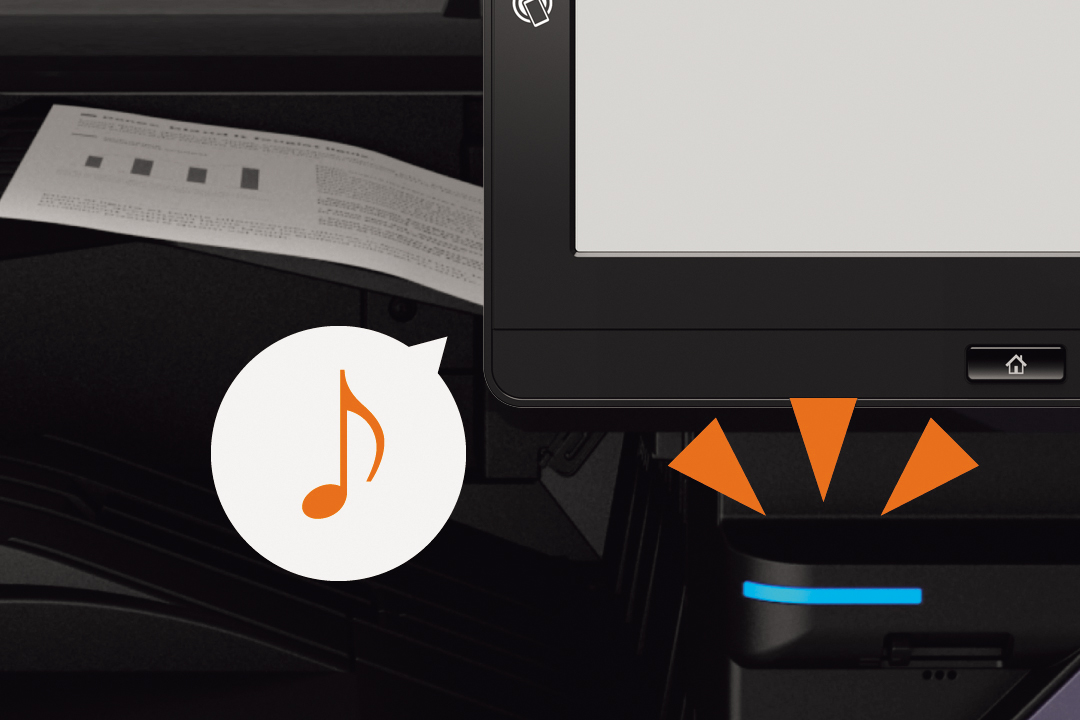
When the device detects paper on the job separator, such as a received fax, the LED lamp at the front of the device blinks to notify user. Also, notification sound will be played when the received data is output.
-
Direct incoming faxes through different channels.
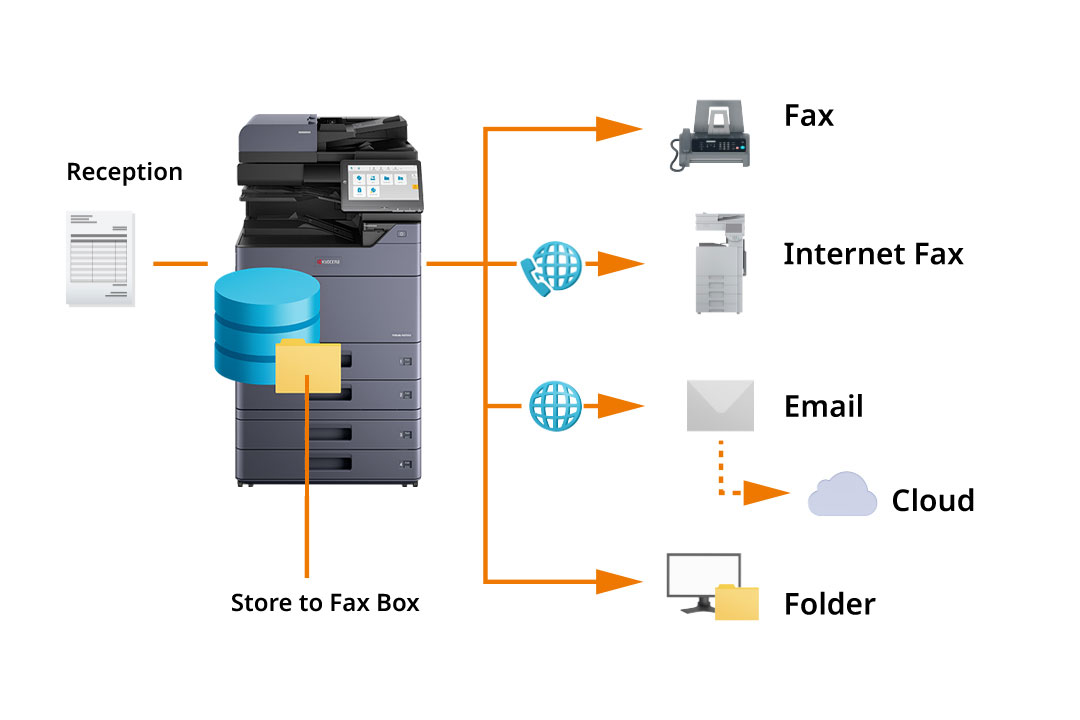
Received faxes can be saved, sent to other fax machines, Internet faxes, email, folders, and cloud services. You can also forward faxes to multiple destinations using different communication methods, like shared folders and email, and set criteria to limit forwarding to specific recipients.
Up to 2,500 address book entries
You can register up to 2,000 individuals and 500 groups of numbers and addresses for fax transmission. In the groups, you can register not only fax numbers, but also e-mail addresses and shared folders on servers and PCs. Boost efficiency by creating a one-touch button to shorten the call operation for frequently used destinations. Up to 1,000 projects can be registered.
Prevent incorrect transmission due to typo
Equipped with FASEC1 fax security function. You can confirm the information you have entered by going to the confirmation screen or by pressing the number twice before sending. You can also prohibit the setting of "Numeric keypad entry for numbers", "Sending to unregistered address book number", "Redial" and "Broadcast".
Using digital faxing
Sending and receiving faxes electronically saves time and reduces paper waste.
-
Avoiding the production of superfluous junk faxes.
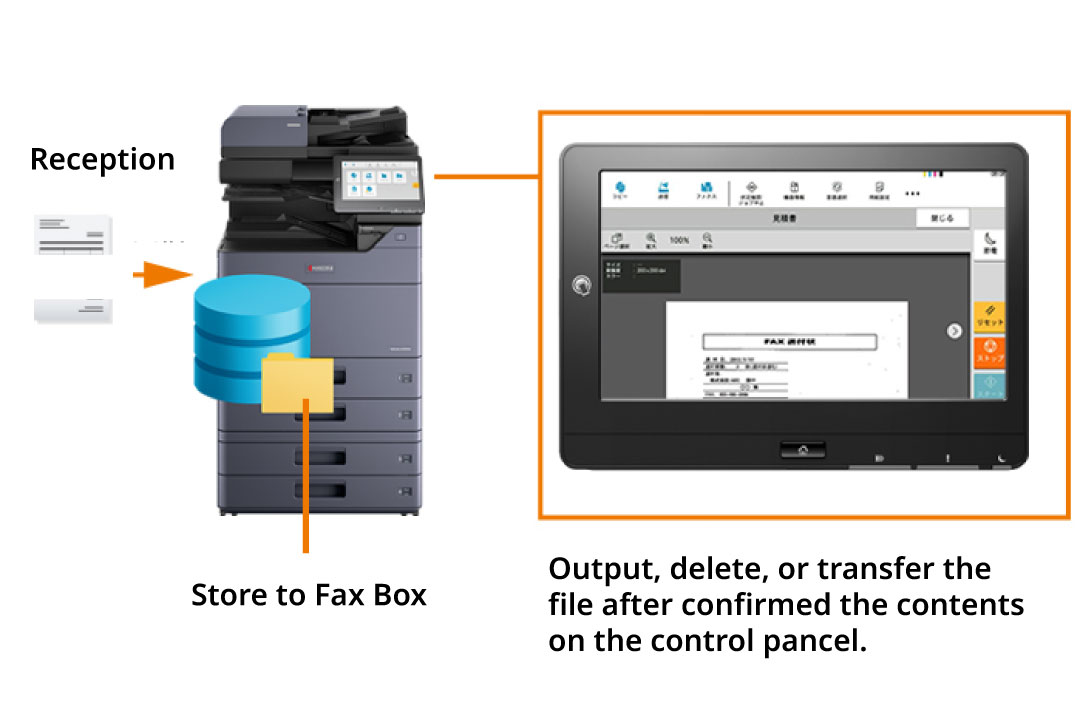
Incoming faxes can either be printed right away or previewed prior to printing. The fax memory inbox feature allows for the temporary storage of received faxes in memory. By reviewing the documents on the operation panel, users can select and print only the necessary documents, thus preventing the printing of unwanted junk faxes.
-
Fax documents directly from your computer
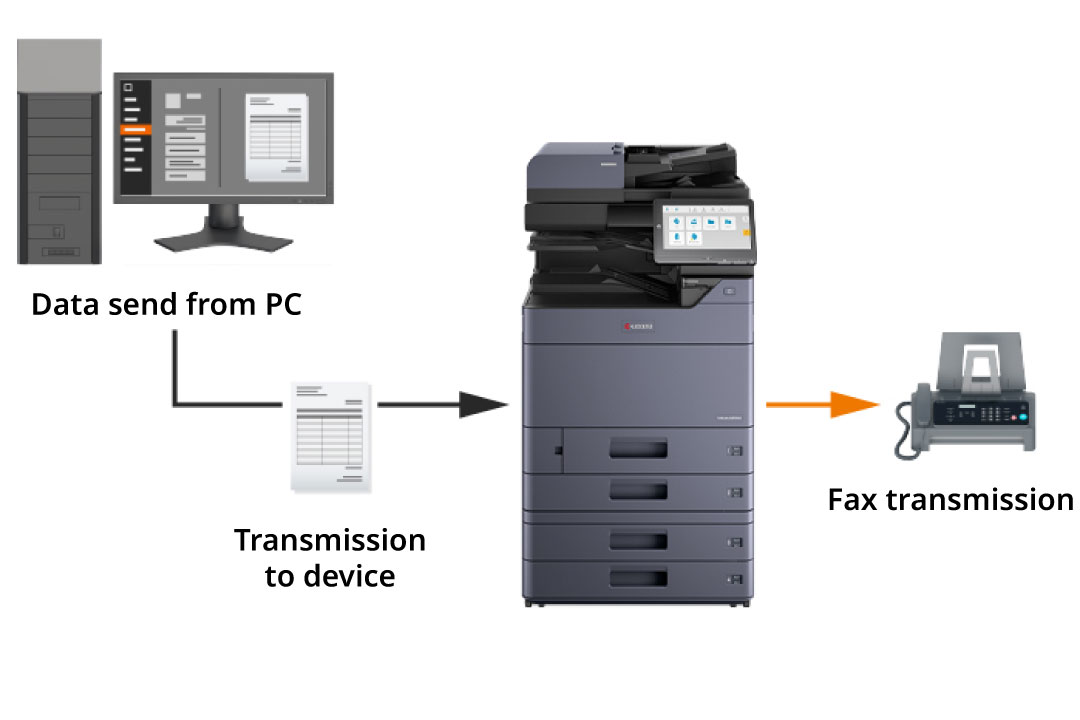
Network Fax is a feature that utilizes the print driver of a computer to transmit faxes. By sending file data directly, you can eliminate the need to physically go to the multifunction device every time you want to send a fax, enabling a paperless workflow. Moreover, this method also helps in reducing costs.
-
Preserve data while sending fax documents
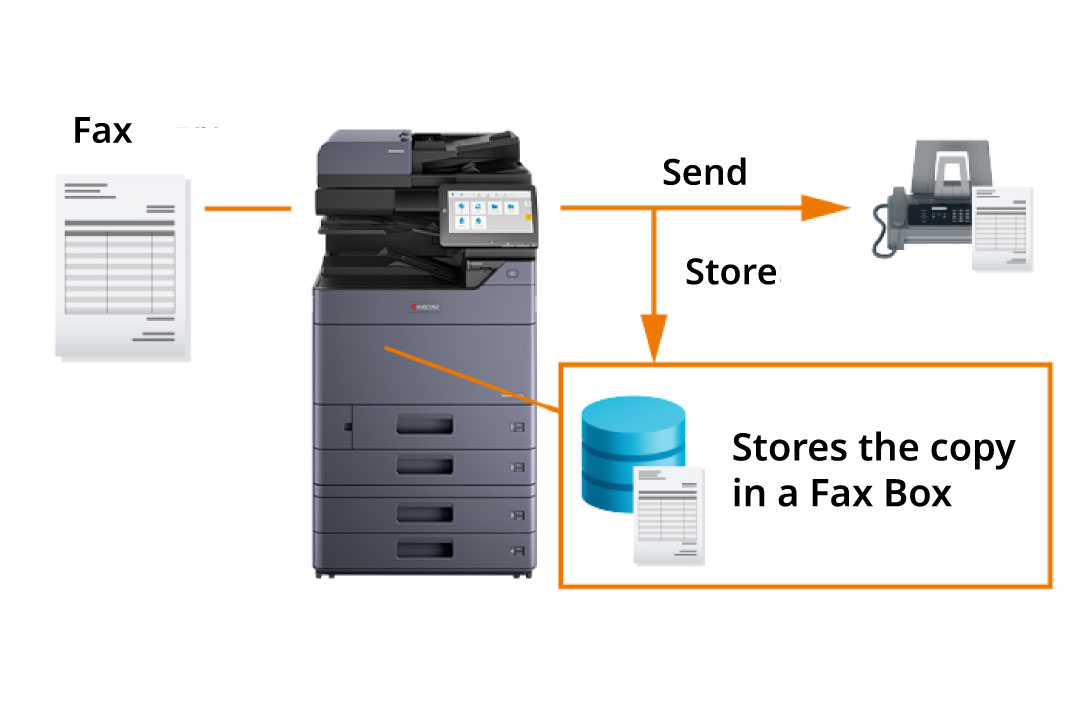
The fax original save feature ensures that the fax original is automatically saved once it is sent. The saved data is stored in a specific user box (user/group storage) within the multifunction device, allowing for easy resending. This functionality proves to be beneficial when faxing regular order forms.
Different functions developed for simple utilization.
A range of features designed to cater to the fax requirements of businesses.
Support for a wide variety of paper sizes
Supports a range of paper sizes including A3 to A6. Moreover, with a document feeder, you have the ability to scan lengthy documents up to 1,600 mm in width (A4 size).
Small characters are transmitted clearly
When sending a fax, adjust the resolution and contrast to match the document, especially for fine details or small text.
Generates reports on the status of sent and received messages.
The control panel enables you to monitor the fax history for a maximum of 100 transmissions and receptions. You have access to see the status of transmissions and receptions (successful/cancelled/error) as well as the destination. Furthermore, you can print management reports for the 50 most recent transmissions and receptions. These reports can be scheduled for automation through settings.
Separate fax lines for different purposes.
There is a maximum of two lines for faxing. Operations such as using different fax lines for business partners and general users can also be realized with a single device.
*Requires two sets of FAX System 14 are installed.
Prevent paper selection mistakes by specifying a paper cassette
If you specified a cassette to feed paper when you receive a fax, the machine will not automatically feed paper from any other cassette. This prevents you from printing on different-sized paper. Furthermore, specifying the paper destination of the fax printout prevents the document from being mixed with the copied or printed copy.
Other Faxing Features
Fax Transmission Settings
●Outgoing Faxes (Fax Direct Transmission, memory transmission, timer transmission, transmission reservation, interrupt transmission) ●Document Size (Auto Detect/Custom) ●Outgoing Document Size (Select from document size, standard size and others.) ●Mixed Size Originals (process documents of different sizes all at once)* ●Continuous Scan (Batch processing of files read separately) ●Duplex, Spread Orientation ●Original Orientation ●Reduced/Enlarged ●Centering ●Border Erase (Erase the black border that froms around the image) ●File Name Entry ●Long Original (Reads long-sized original documents using document processor) ●Network Fax (Setting and sending via the Internet factory driver: Attaching a cover page, sending a timer linked with the main body address book, displaying an address confirmation dialog, and printing at the same time)
Destination Registration
●Panel Input ●Select from address book (Search by Address Name, one-touch key, and short key) ●Batch Sending (Up to 500 group addresses)
Fax Reception Setting
●Reception Method (Auto reception, fax/telephone automatic switching reception, fax/answering machine automatic switching reception, manual reception) ●Polling Reception (Receives the sender's original using the receiver's operation) ●F-Code Communication Setting (Sending documents to the communication box of the receiver: F-code confidential communication, F-code bulletin board reception, F-code relay broadcast communication, fax box transfer of received documents) ●Received File Processing (Print or forward print according to conditions after receiving memory) ●Receiving and Forwarding (PC Folder, Mail, Other Fax/Internet Fax, Fax Box) ●Fax Dedicated Paper Feed Setting ●Paper Type Setting ●Print Settings (Duplex, 2 in 1)
Image Quality Settings
●Transmssion Resolution (Normal: 200 × 100 dpi, Fine: 200 × 200 dpi , Super Fine: 200 × 400 dpi ,Ultra Fine: 400 × 400 dpi , 600 × 600 dpi) ●Receive Resolution (1200 × 1200 dpi) ●Document Density ●Document Quality (Text + Photo Mode, Photo Mode, Text Mode (for Thin Text/Thin Lines))
Prevention of misoperation, Security
●Destination Check before Send ●Destination Double Check ●Fax Encryption ●Transmission Permission (Registration of permitted fax numbers/ID numbers, block faxes from unknown numbers) ●Operation Time Setting (limit FAX reception in night-time)
Fax box (Temporarily saving data in device memory)
●Box Document Display (Fax preview, document list) ●Box Document Search (Document name, document box number, and document box name) ●Box reception settings (Memory Reception, Reception Display, Reception Forwarding) ●Box Sending Setting (File format, transmission resolution, file size check, timer transmission, delete after transmission, file division, FTP encryption transmission) ●Box Document Printing (Delete after printing, Eco Print setting, and Margin setting)
Fax Management
●Send and Print ●Send and Save ●Record on Received Date and Time ●Outputting Address Book List ●Printing Fax Box List ●Sending/Checking Received History of Fax Job ●Printing Communication Management Report (Fax transmission/reception) ●Printing Result Report (Send result, receive result, abort job) ●Result Report Setting
Internet Fax Settings (Requires configuration with optional Internet Fax Kit (A))
●Fax Send (Simple Mode, Full Mode, Direct SMTP (Full mode)) ●i-Fax Subject/Message Input ●Forwarding of received fax to multiple recipients via Internet fax
Other Features
●Stamp (text stamp, bates stamp) ●On-hook Dial Selection ●Multi-Port (Require 2 fax line, i.e. configuration with 2 x FAX System 14: Port designation, receive-only port setting, port restriction for department management)