
KYOCERA Document Solutions


KYOCERA Document SolutionsSolution Support Page
| Q |
If I log out during printing, the print jobs after the current one are canceled. Is there a way to continue printing? |
| A |
Yes, there is a way to continue printing even after logging out. Please check the following. |
Settings change procedure
(Administrator only)
The setting is located under the "Device client" tab in the "Organization profile."
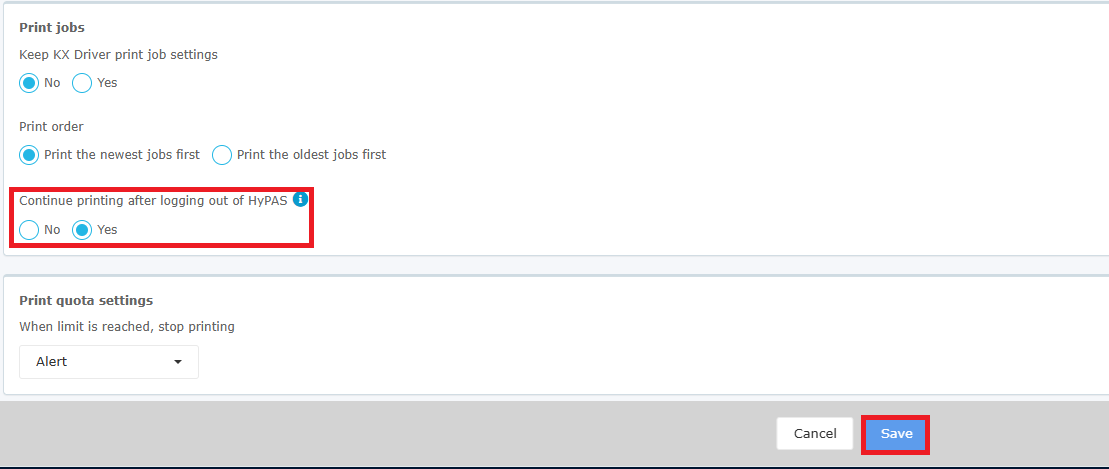
Change "Continue printing after logging out of HyPAS" under "Print jobs" from "No" to "Yes," then click "Save."
With this setting changed, if a user logs out from KCPS HyPAS Application while their print job is running, the print job continues to print.
Change "Continue printing after logging out of HyPAS" under "Print jobs" from "No" to "Yes," then click "Save."
With this setting changed, if a user logs out from KCPS HyPAS Application while their print job is running, the print job continues to print.
ⓘ Note:
Enabling this feature may result in incorrect usage counts,
reducing the accuracy of reports.
Enabling this feature may result in incorrect usage counts,
reducing the accuracy of reports.